


Visual Studio 2008 Express Edition でバイオリズム(biorhythm)を作ろう
バイオリズムを地道に算術計算で求めてみる
��Visual Studio 2008 Express Editioを起動します
��Windowsフォームアプリケーションを選択します。
適当な名前をつけます。ここではbiorとしました。
��線画の準備のためペイントをセットします。
新しくできたホームの右クリックをします。プロパティを選択して雷マークをクリックし「プロパティ」「表示」「ペイント」とすすめます。
private: System::Void button1_Click(System::Object^ sender, System::EventArgs^ e) {}
が自動作成されます。ここにバイオリズムのグラフを書きます。
��Formにコントロールを配置します。
ここではコマンドボタン1とテキストボックス1−6を使用します。
�ゥ侫�ームをクリックして
private: System::Void Form1_Load(System::Object^ sender, System::EventArgs^ e) {}を作成しておきます。
パブリックに静的変数を設定
格差婦プログラムからこの変数がアクセス可能になります。
static int fYear,fMonth,fDay,eYear,eMonth,eDay;
static int day,day1,day2,day3;
その他 重要事項
1)グラフィックの設定
Graphics^ 変数名=e->Graphics;
例 Graphics^ gr=e->Graphics;
gr->FillRectangle(Brushes::Red,x1+xx,yy-y1,1,1);
2)Invalidate(); //再線画されます
��stdfax.hにsin等を使用するため数学的関数をセットします。
#include <math.h>
#include <time.h>
�Г海海濃藩僂靴申斗廚粉愎�
1)点を打つ(本来は四角を書く)
gr->FillRectangle(Brushes::色,x軸,y軸,幅,高);
例 gr->FillRectangle(Brushes::Red,x1+xx,yy-y1,1,1); ..1,1が点になる
2)線を引く
gr->DrawLine(Pens::色, x始点,y始点,x終点,y終点);
例 gr->DrawLine(Pens::Black, xx,yy-100,xx,yy+100);
3)フォントの設定
System::Drawing::Font^ font1=gcnew System::Drawing::Font("MS ゴシック",サイズ);
例 System::Drawing::Font^ font1=gcnew System::Drawing::Font("MS ゴシック",11);
4)グラフィックとして文字を書く
gr->DrawString("文字列",font1,Brushes::色,x位置,y位置);
例 gr->DrawString("測定年の 日数=",font1,Brushes::Black,10,360);
�┘丱ぅ�リズム
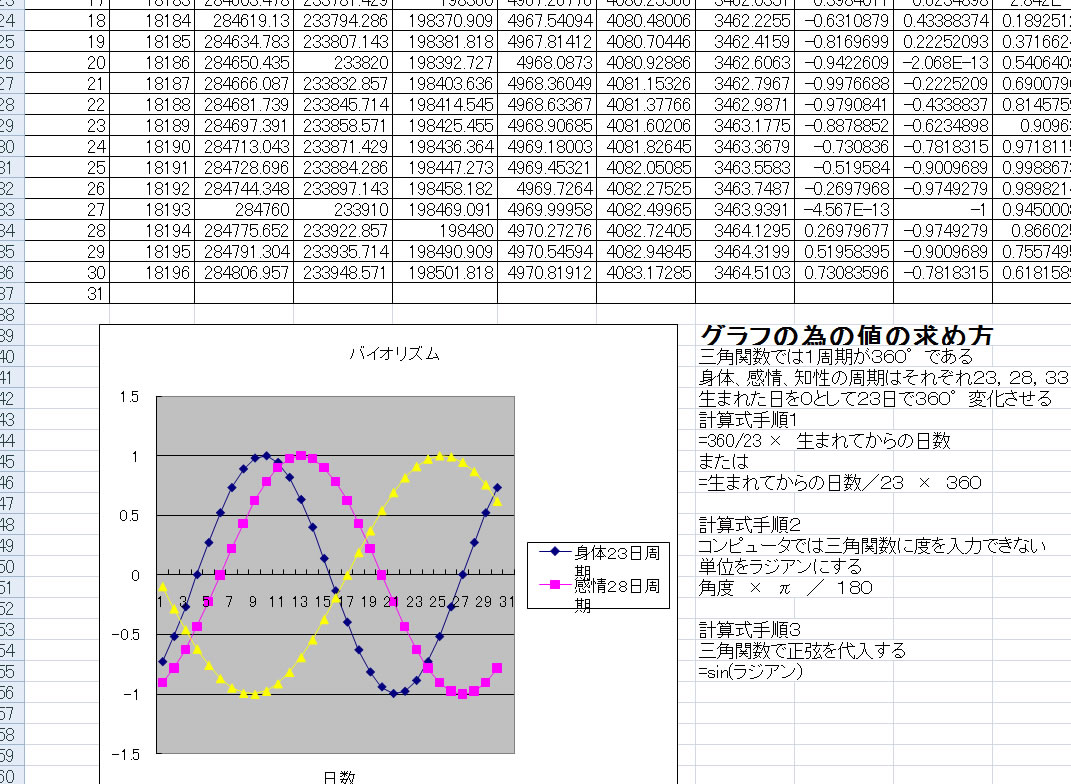
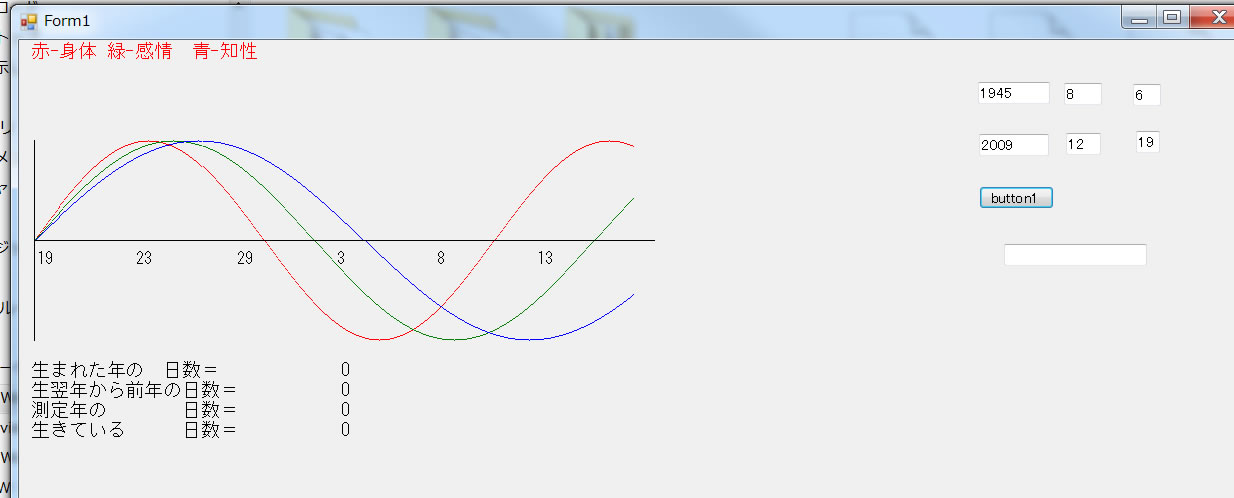
各リズムは誕生日を基準とする同じ振幅の正弦波SINとして表され、身体リズムは23日、感情リズムは28日、知性リズムは33日の周期で変化する。
まず、生まれてから本日(測定日)までの日数を出す。その日数から角度を求める。1周期は360°なので360を23などで割り、日数掛けると測定日までの角度が求まる。この角度をラジアンにする。
式 360÷23×生きている日数×円周率/180
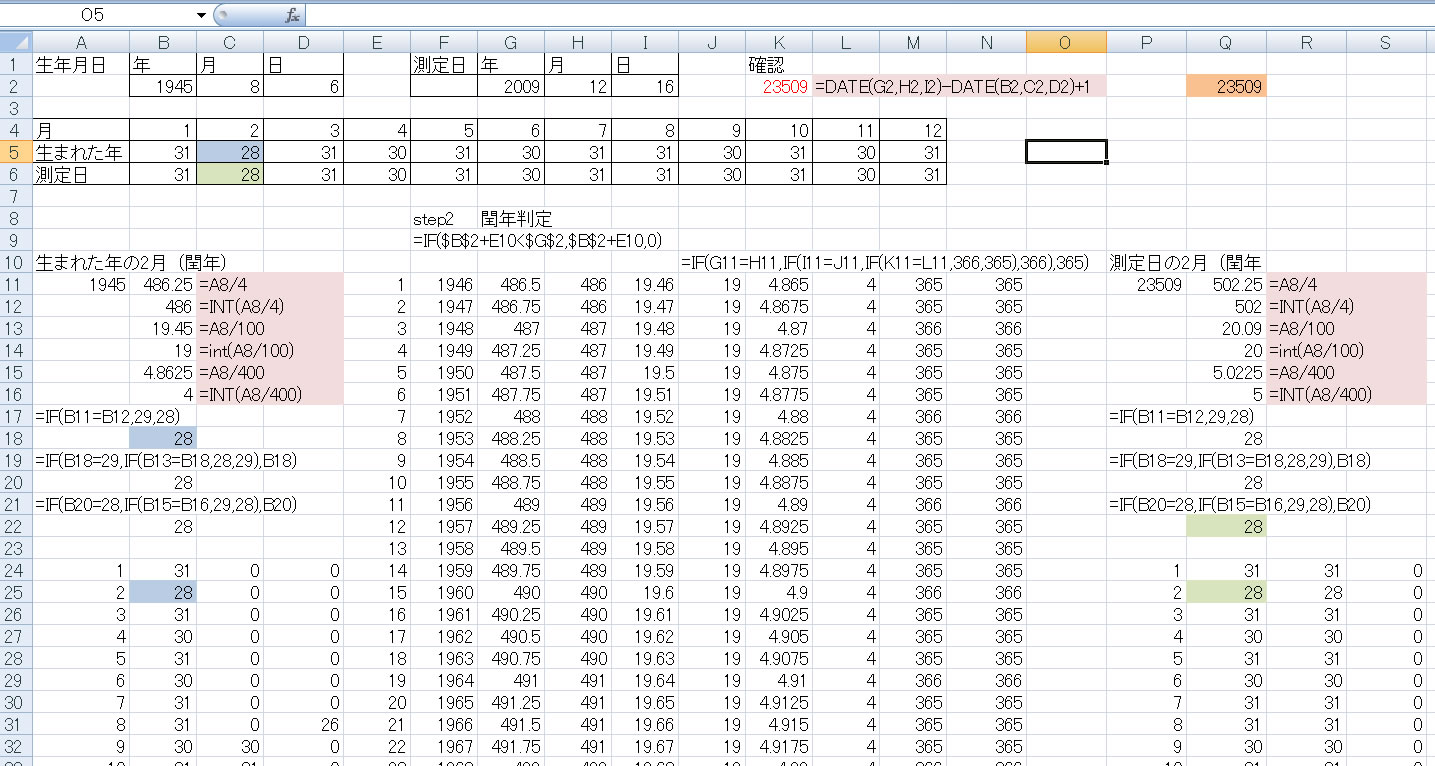
エクセル説明シート参照
閏年を考慮し生きている日数を求める
シート1 sum if int のみの単純な計算で求めている
シート2 これを万能にしている
シート3 date関数を用いてグラフ化している
バイオ完成.xls ←ダウンロード
vbaによるバイオリズム←ダウンロード
�� 次が入力した全体のプログラム
赤字が記入したもの
茶色は自動作成されたもの
#pragma once
namespace bior {
using namespace System;
using namespace System::ComponentModel;
using namespace System::Collections;
using namespace System::Windows::Forms;
using namespace System::Data;
using namespace System::Drawing;
/// <summary>
/// Form1 の概要
///
/// 警告: このクラスの名前を変更する場合、このクラスが依存するすべての .resx ファイルに関連付けられた
/// マネージ リソース コンパイラ ツールに対して 'Resource File Name' プロパティを
/// 変更する必要があります。この変更を行わないと、
/// デザイナと、このフォームに関連付けられたローカライズ済みリソースとが、
/// 正しく相互に利用できなくなります。
/// </summary>
public ref class Form1 : public System::Windows::Forms::Form
{
public:
Form1(void)
{
InitializeComponent();
//
//TODO: ここにコンストラクタ コードを追加します
//
}
private: System::Windows::Forms::TextBox^ textBox7;
public:
static int fYear=1945; //原爆投下日
static int fMonth=8;
static int fDay=6;
static int eYear=2009; //プログラム作成日 23511
static int eMonth=12;
static int eDay=19;
static int gMonth=31;
static int day,day1,day2,day3;
protected:
/// <summary>
/// 使用中のリソースをすべてクリーンアップします。
/// </summary>
~Form1()
{
if (components)
{
delete components;
}
}
private: System::Windows::Forms::Button^ button1;
protected:
private: System::Windows::Forms::TextBox^ textBox1;
private: System::Windows::Forms::TextBox^ textBox2;
private: System::Windows::Forms::TextBox^ textBox3;
private: System::Windows::Forms::TextBox^ textBox4;
private: System::Windows::Forms::TextBox^ textBox5;
private: System::Windows::Forms::TextBox^ textBox6;
private:
/// <summary>
/// 必要なデザイナ変数です。
/// </summary>
System::ComponentModel::Container ^components;
#pragma region Windows Form Designer generated code
/// <summary>
/// デザイナ サポートに必要なメソッドです。このメソッドの内容を
/// コード エディタで変更しないでください。
/// </summary>
void InitializeComponent(void)
{
this->button1 = (gcnew System::Windows::Forms::Button());
this->textBox1 = (gcnew System::Windows::Forms::TextBox());
this->textBox2 = (gcnew System::Windows::Forms::TextBox());
this->textBox3 = (gcnew System::Windows::Forms::TextBox());
this->textBox4 = (gcnew System::Windows::Forms::TextBox());
this->textBox5 = (gcnew System::Windows::Forms::TextBox());
this->textBox6 = (gcnew System::Windows::Forms::TextBox());
this->textBox7 = (gcnew System::Windows::Forms::TextBox());
this->SuspendLayout();
//
// button1
//
this->button1->Location = System::Drawing::Point(960, 146);
this->button1->Name = L"button1";
this->button1->Size = System::Drawing::Size(75, 23);
this->button1->TabIndex = 0;
this->button1->Text = L"button1";
this->button1->UseVisualStyleBackColor = true;
this->button1->Click += gcnew System::EventHandler(this, &Form1::button1_Click);
//
// textBox1
//
this->textBox1->Location = System::Drawing::Point(959, 42);
this->textBox1->Name = L"textBox1";
this->textBox1->Size = System::Drawing::Size(72, 22);
this->textBox1->TabIndex = 1;
//
// textBox2
//
this->textBox2->Location = System::Drawing::Point(1045, 43);
this->textBox2->Name = L"textBox2";
this->textBox2->Size = System::Drawing::Size(38, 22);
this->textBox2->TabIndex = 2;
//
// textBox3
//
this->textBox3->Location = System::Drawing::Point(1114, 44);
this->textBox3->Name = L"textBox3";
this->textBox3->Size = System::Drawing::Size(28, 22);
this->textBox3->TabIndex = 3;
//
// textBox4
//
this->textBox4->Location = System::Drawing::Point(960, 94);
this->textBox4->Name = L"textBox4";
this->textBox4->Size = System::Drawing::Size(70, 22);
this->textBox4->TabIndex = 4;
//
// textBox5
//
this->textBox5->Location = System::Drawing::Point(1047, 93);
this->textBox5->Name = L"textBox5";
this->textBox5->Size = System::Drawing::Size(35, 22);
this->textBox5->TabIndex = 5;
//
// textBox6
//
this->textBox6->Location = System::Drawing::Point(1117, 91);
this->textBox6->Name = L"textBox6";
this->textBox6->Size = System::Drawing::Size(24, 22);
this->textBox6->TabIndex = 6;
//
// textBox7
//
this->textBox7->Location = System::Drawing::Point(985, 204);
this->textBox7->Name = L"textBox7";
this->textBox7->Size = System::Drawing::Size(143, 22);
this->textBox7->TabIndex = 7;
//
// Form1
//
this->AutoScaleDimensions = System::Drawing::SizeF(8, 15);
this->AutoScaleMode = System::Windows::Forms::AutoScaleMode::Font;
this->ClientSize = System::Drawing::Size(1229, 600);
this->Controls->Add(this->textBox7);
this->Controls->Add(this->textBox6);
this->Controls->Add(this->textBox5);
this->Controls->Add(this->textBox4);
this->Controls->Add(this->textBox3);
this->Controls->Add(this->textBox2);
this->Controls->Add(this->textBox1);
this->Controls->Add(this->button1);
this->Name = L"Form1";
this->Text = L"Form1";
this->Load += gcnew System::EventHandler(this, &Form1::Form1_Load);
this->Paint += gcnew System::Windows::Forms::PaintEventHandler(this, &Form1::Form1_Paint);
this->ResumeLayout(false);
this->PerformLayout();
}
#pragma endregion
private: System::Void Form1_Paint(System::Object^ sender, System::Windows::Forms::PaintEventArgs^ e) {
Graphics^ gr=e->Graphics;
System::Drawing::Font^ font1=gcnew System::Drawing::Font("MS ゴシック",11);
System::Drawing::Font^ font2=gcnew System::Drawing::Font("MS ゴシック",10);
gr->DrawString("赤-身体",font1,Brushes::Red,10,1);
gr->DrawString("緑-感情",font1,Brushes::Green,110,1);
gr->DrawString("青-知性",font1,Brushes::Blue,210,1);
gr->DrawString("生まれた年の 日数=",font1,Brushes::Black,10,320);
gr->DrawString(day1.ToString(),font1,Brushes::Black,320,320);
gr->DrawString("生翌年から前年の日数=",font1,Brushes::Black,10,340);
gr->DrawString(day2.ToString(),font1,Brushes::Black,320,340);
gr->DrawString("測定年の 日数=",font1,Brushes::Black,10,360);
gr->DrawString(day3.ToString(),font1,Brushes::Black,320,360);
gr->DrawString("生きている 日数=",font1,Brushes::Black,10,380);
gr->DrawString(day.ToString(),font1,Brushes::Black,320,380);
double t;
int x1,tt=1,td;
int xx=15,yy=200;
int y1,y2,y3;
td=eDay;
for(t=1;t<=31;t=t+0.05){
x1=(t-1)*20;
y1=sin(3.141592654*((day + t-1)/23)*360/180)*100;
gr->FillRectangle(Brushes::Red,x1+xx,yy-y1,1,1);
y2=sin(3.141592654*((day + t-1)/28)*360/180)*100;
gr->FillRectangle(Brushes::Green,x1+xx,yy-y2,1,1);
y3=sin(3.141592654*((day + t-1)/33)*360/180)*100;
gr->FillRectangle(Brushes::Blue,x1+xx,yy-y3,1,1);
td=(x1/20)+eDay;
if (td>=gMonth) td=td-gMonth;
tt++;
if(tt==100|| t==1){
gr->DrawString(td.ToString(),font2,Brushes::Black,x1+xx,yy+10);
tt=0;
}
}
gr->DrawLine(Pens::Black, xx,yy,xx+31*20,yy);
gr->DrawLine(Pens::Black, xx,yy-100,xx,yy+100);
}
private: System::Void button1_Click(System::Object^ sender, System::EventArgs^ e) {
int month_data[13] = {0,31,0,31,30,31,30,31,31,30,31,30,31};
int leap;
int t;
fYear=int::Parse(textBox1->Text);
fMonth=int::Parse(textBox2->Text);
fDay=int::Parse(textBox3->Text);
eYear=int::Parse(textBox4->Text);
eMonth=int::Parse(textBox5->Text);
eDay=int::Parse(textBox6->Text);
// step 1 生まれた年の日数を出す
day1 = 0;
if ((0 == (fYear % 400)) || (0 != (fYear % 100)) && (0 == (fYear % 4)))
month_data[2]=29; //閏年だから 2月が29日
else
month_data[2]=28;
for(t=fMonth;t<=12;t++){
day1 =day1+month_data[t];
}
day1 = day1+1-fDay;
// step 2 生まれた翌年から測定年前の日数の総数を出す
day2 = 0;
for(t=fYear+1;t<=eYear-1;t++){
if ((0 == (t % 400)) || (0 != (t % 100)) && (0 == (t % 4)))
leap=366;
else
leap=365;
day2 =day2 + leap;
}
// step 3 測定日の日数の総数を出す
day3 = 0;
if ((0 == (eYear % 400)) || (0 != (eYear % 100)) && (0 == (eYear % 4)))
month_data[2]=29;
else
month_data[2]=28;
for(t=1;t<=eMonth-1;t++){
day3 = day3+ month_data[t];
}
day3 = day3 + eDay;
gMonth=month_data[eMonth];
//生まれてからの日数 */
day = day1 + day2 + day3;
textBox7->Text=day.ToString();
//再線画
Invalidate();
}
private: System::Void Form1_Load(System::Object^ sender, System::EventArgs^ e) {
textBox1->Text="1945";
textBox2->Text="8";
textBox3->Text="6";
time_t current;
struct tm *local;
time(¤t); /* 現在の時刻を取得 */
local = localtime(¤t); /* 地方時の構造体に変換 */
textBox4->Text=(local->tm_year + 1900).ToString();
textBox5->Text=(local->tm_mon + 1).ToString() ;
textBox6->Text=(local->tm_mday).ToString() ;
day=0;
}
};
}
実行 プログラムダウンロード
プロジェクト ソース bior-s.zip
拡張版
private: System::Void Form1_Paint(System::Object^ sender, System::Windows::Forms::PaintEventArgs^ e) {
Graphics^ gr=e->Graphics;
System::Drawing::Font^ font1=gcnew System::Drawing::Font("MS ゴシック",11);
System::Drawing::Font^ font2=gcnew System::Drawing::Font("MS ゴシック",10);
gr->DrawString("赤-身体",font1,Brushes::Red,10,1);
gr->DrawString("緑-感情",font1,Brushes::Green,110,1);
gr->DrawString("青-知性",font1,Brushes::Blue,210,1);
gr->DrawString("生まれた年の 日数=",font1,Brushes::Black,10,320);
gr->DrawString(day1.ToString(),font1,Brushes::Black,320,320);
gr->DrawString("生翌年から前年の日数=",font1,Brushes::Black,10,340);
gr->DrawString(day2.ToString(),font1,Brushes::Black,320,340);
gr->DrawString("測定年の 日数=",font1,Brushes::Black,10,360);
gr->DrawString(day3.ToString(),font1,Brushes::Black,320,360);
gr->DrawString("生きている 日数=",font1,Brushes::Black,10,380);
gr->DrawString(day.ToString(),font1,Brushes::Black,320,380);
double t,x1,y1,y2,y3;;
int tt=1,td;
int xx=15,yy=200;
td=eDay;
for(t=1;t<=31;t=t+0.05){
x1=(t-1)*20;
y1=sin(3.141592654*((day + t-1)/23)*360/180)*100;
gr->FillRectangle(Brushes::Red,x1+xx,yy-y1,1,1);
y2=sin(3.141592654*((day + t-1)/28)*360/180)*100;
gr->FillRectangle(Brushes::Green,x1+xx,yy-y2,1,1);
y3=sin(3.141592654*((day + t-1)/33)*360/180)*100;
gr->FillRectangle(Brushes::Blue,x1+xx,yy-y3,1,1);
td=(x1/20)+eDay;
if (td>=gMonth) td=td-gMonth;
tt++;
if(tt==100|| t==1){
gr->DrawString(td.ToString(),font2,Brushes::Black,x1+xx,yy+10);
tt=0;
}
}
gr->DrawLine(Pens::Black, xx,yy,xx+31*20,yy);
gr->DrawLine(Pens::Black, xx,yy-100,xx,yy+100);
}
private: System::Void button1_Click(System::Object^ sender, System::EventArgs^ e) {
int month_data[13] = {0,31,0,31,30,31,30,31,31,30,31,30,31};
int leap;
int t;
int youbi1,youbi2;
fYear=int::Parse(textBox1->Text);
fMonth=int::Parse(textBox2->Text);
fDay=int::Parse(textBox3->Text);
eYear=int::Parse(textBox4->Text);
eMonth=int::Parse(textBox5->Text);
eDay=int::Parse(textBox6->Text);
// step 1 生まれた年の日数を出す
day1 = 0;
if ((0 == (fYear % 400)) || (0 != (fYear % 100)) && (0 == (fYear % 4)))
month_data[2]=29; //閏年だから 2月が29日
else
month_data[2]=28;
for(t=fMonth;t<=12;t++){
day1 =day1+month_data[t];
}
day1 = day1+1-fDay;
// step 2 生まれた翌年から測定年前の日数の総数を出す
day2 = 0;
for(t=fYear+1;t<=eYear-1;t++){
if ((0 == (t % 400)) || (0 != (t % 100)) && (0 == (t % 4)))
leap=366;
else
leap=365;
day2 =day2 + leap;
}
// step 3 測定日の日数の総数を出す
day3 = 0;
if ((0 == (eYear % 400)) || (0 != (eYear % 100)) && (0 == (eYear % 4)))
month_data[2]=29;
else
month_data[2]=28;
for(t=1;t<=eMonth-1;t++){
day3 = day3+ month_data[t];
}
day3 = day3 + eDay;
gMonth=month_data[eMonth];
//生まれてからの日数 */
if ( fYear<eYear){ day = day1 + day2 + day3;}
else
{ textBox11->Text="測定できません";
day=0;
}
if(day>0) textBox11->Text=day.ToString();
//再線画
Invalidate();
//=====おまけ=====================================
//曜日の表示
//textBox6->Text=cyoubi1[local->tm_wday];
array<String^ >^ wday = gcnew array<String^> {"日", "月", "火", "水", "木", "金", "土"};
textBox10->Text=wday[youbi]; // 日曜からの曜日 : 0 ... 6
int amari,motome;
amari=day % 7;
motome=youbi - amari+1 ;
if( motome< 0 ) motome=7+motome;
textBox12->Text=wday[motome]; // 日曜からの曜日 : 0 ... 6
textBox13->Text=amari.ToString(); // 日曜からの曜日 : 0 ... 6
// textBox8->Text=ws[dt->tm_wday]; // 日曜からの曜日 : 0 ... 6
//==========================
}
private: System::Void Form1_Load(System::Object^ sender, System::EventArgs^ e) {
textBox1->Text="1945"; //原爆投下日
textBox2->Text="8";
textBox3->Text="6";
time_t current;
struct tm *local;
time(¤t); /* 現在の時刻を取得 */
local = localtime(¤t); /* 地方時の構造体に変換 */
textBox4->Text=(local->tm_year + 1900).ToString();
textBox5->Text=(local->tm_mon + 1).ToString() ;
textBox6->Text=(local->tm_mday).ToString() ;
textBox7->Text=(local->tm_year + 1900).ToString();
textBox8->Text=(local->tm_mon + 1).ToString() ;
textBox9->Text=(local->tm_mday).ToString() ;
youbi=local->tm_wday;
day=0;
}
};
}
/*
// tm 構造体
struct tm
{
int tm_sec; // 秒 : 0 ... 59
int tm_min; // 分 : 0 ... 59
int tm_hour; // 時 : 0 ...23
int tm_mday; // 日 : 1 ... 31
int tm_mon; // 1月からの月数 : 0 ... 11
int tm_year; // 1900年からの年数
int tm_wday; // 日曜からの曜日 : 0 ... 6
int tm_yday; // 1月1日からの日数 : 0 ... 365
int tm_isdst; // 夏時間は正、そうでなければ0、不明は負
};
*/
実行 プログラムダウンロード



