


Visual Studio 2012 Express Edition でForm アプリを作ろう
1日目
Visual Studio Express for windows Desktop Visual C++ 2012にはフォームが無い。
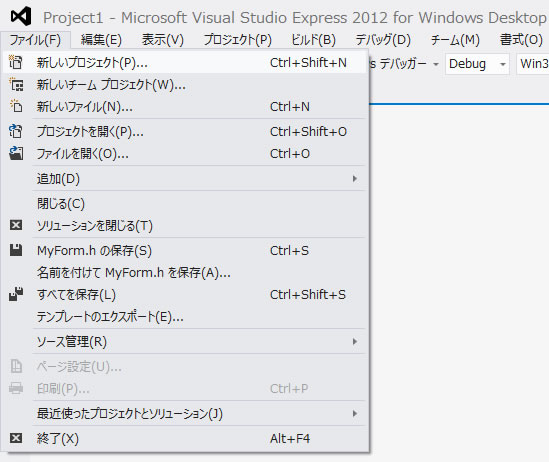
1.新しいプロジェクトを作成
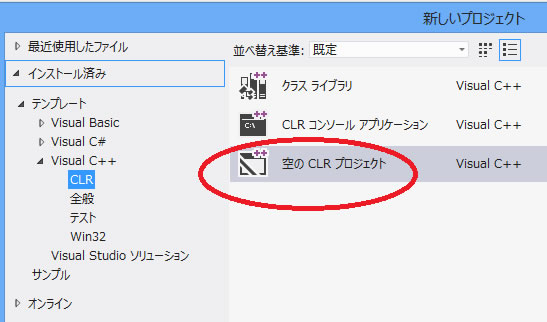
2.空のCLRプロジェクト作成
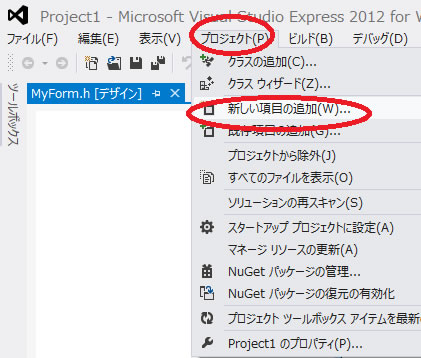
3.プロジェクトから「新しい項目の追加」
4.
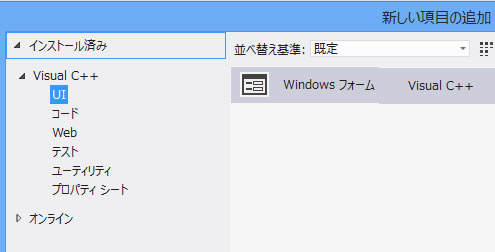
5.フォームにボタンを追加
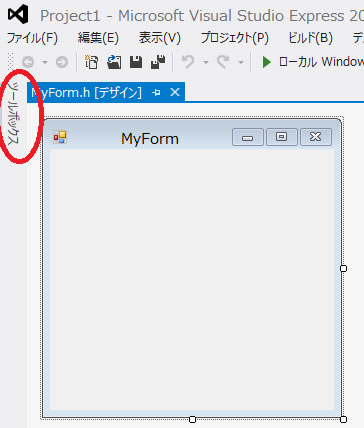
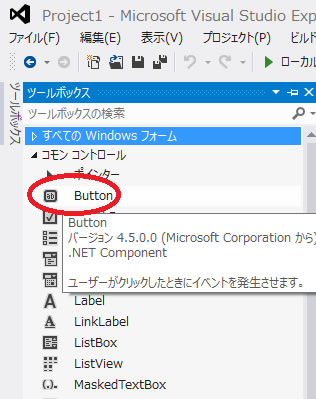
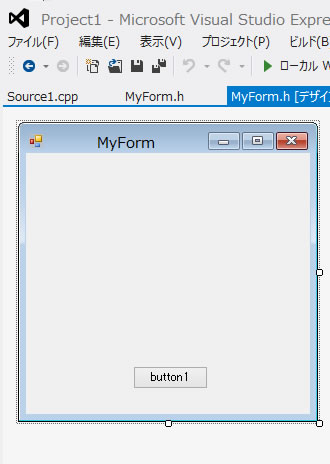
6.souece1.cppに次を入力
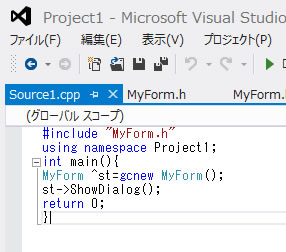
#include "MyForm.h"
using namespace Project1;
[STAThreadAttribute]
/*
単一のスレッドを想定、マルチスレッドの対応し
オブジェクトはSTA(Single-Threaded Apartment)か
MTA(Multithreaded Apartment) */
int main(){
Console::SetWindowSize(1,1); //Console 最小化
MyForm ^st=gcnew MyForm();
st->ShowDialog();
return 0;
}
コンパイル実行をする
例
#pragma once
static int hai[50];
namespace Project2 {
using namespace System;
using namespace System::ComponentModel;
using namespace System::Collections;
using namespace System::Windows::Forms;
using namespace System::Data;
using namespace System::Drawing;
/// <summary>
/// MyForm の概要
/// </summary>
public ref class MyForm : public System::Windows::Forms::Form
{
public:
MyForm(void)
{
InitializeComponent();
//
//TODO: ここにコンストラクター コードを追加します
//
}
protected:
/// <summary>
/// 使用中のリソースをすべてクリーンアップします。
/// </summary>
~MyForm()
{
if (components)
{
delete components;
}
}
private: System::Windows::Forms::Button^ button1;
protected:
private:
/// <summary>
/// 必要なデザイナー変数です。
/// </summary>
System::ComponentModel::Container ^components;
public:
array<Bitmap^>^ bmpdata;
void DispHai( int nohai,int xx){
Graphics^ gr=this->CreateGraphics();
int X0=10,Y0=1;
//Pen^ pen1=gcnew Pen(col);
//原画像を左上に描画する
if(xx==1){
Bitmap^ bmap1; //bmap1の確保
bmap1=bmpdata[nohai];
gr->DrawImage(bmap1,X0,Y0);
}
}
#pragma region Windows Form Designer generated code
/// <summary>
/// デザイナー サポートに必要なメソッドです。このメソッドの内容を
/// コード エディターで変更しないでください。
/// </summary>
void InitializeComponent(void)
{
this->button1 = (gcnew System::Windows::Forms::Button());
this->SuspendLayout();
//
// button1
//
this->button1->Location = System::Drawing::Point(127, 198);
this->button1->Name = L"button1";
this->button1->Size = System::Drawing::Size(75, 23);
this->button1->TabIndex = 0;
this->button1->Text = L"button1";
this->button1->UseVisualStyleBackColor = true;
this->button1->Click += gcnew System::EventHandler(this, &MyForm::button1_Click);
//
// MyForm
//
this->AutoScaleDimensions = System::Drawing::SizeF(6, 12);
this->AutoScaleMode = System::Windows::Forms::AutoScaleMode::Font;
this->ClientSize = System::Drawing::Size(284, 261);
this->Controls->Add(this->button1);
this->Name = L"MyForm";
this->Text = L"MyForm";
this->Load += gcnew System::EventHandler(this, &MyForm::MyForm_Load);
this->Paint += gcnew System::Windows::Forms::PaintEventHandler(this, &MyForm::MyForm_Paint);
this->ResumeLayout(false);
}
#pragma endregion
private: System::Void MyForm_Paint(System::Object^ sender, System::Windows::Forms::PaintEventArgs^ e) {
}
private: System::Void button1_Click(System::Object^ sender, System::EventArgs^ e) {
DispHai( 1,1);
}
private: System::Void MyForm_Load(System::Object^ sender, System::EventArgs^ e) {
// array<Bitmap^>^ bmpdata = gcnew array<Bitmap^ >(50);
bmpdata = gcnew array<Bitmap^ >(50);
String^ filename;
int no;
for(no=1;no<10;no++){
filename="c:\\card\\pz"+no+".bmp" ;
bmpdata[no]=gcnew Bitmap(filename);
}
for(no=11;no<20;no++){
filename="c:\\card\\sz"+(no-10)+".bmp" ;
bmpdata[no]=gcnew Bitmap(filename);
}
for(no=21;no<30;no++){
filename="c:\\card\\wz"+(no-20)+".bmp" ;
bmpdata[no]=gcnew Bitmap(filename);
}
for(no=31;no<35;no++){
filename="c:\\card\\kz"+(no-30)+".bmp" ;
bmpdata[no]=gcnew Bitmap(filename);
}
for(no=35;no<38;no++){
filename="c:\\card\\sg"+(no-34)+".bmp" ;
bmpdata[no]=gcnew Bitmap(filename);
}
}
};
}



