


 Visual Studio C++ 2008/2010 Express EditionでWindowsフォームアプリケーションでwin32apiを使用する。その2
c++ cli Form で ディスプレイ 解像度の変更プログラムを作る
学習内容
1. c++ cli Form でwin32apiを使用
2. ref class 参照クラスの配列を作る
3. 画面 解像度の変更
4. フォームFormにコマンドラインから引数を読み込む
Visual Studio C++ 2008/2010 Express EditionでWindowsフォームアプリケーションではC++/CLIが採用されているので、.NET Frameworkを使用する。
有料版にはMFCが付いているが、無料版にはない。Formアプリケーションにwin32apiを使用することは御法度のようであるが、邪道で使う方法
までプロジェクトでFormアプリケーションを作成
今回の作成では ref class 参照クラスの配列を作る
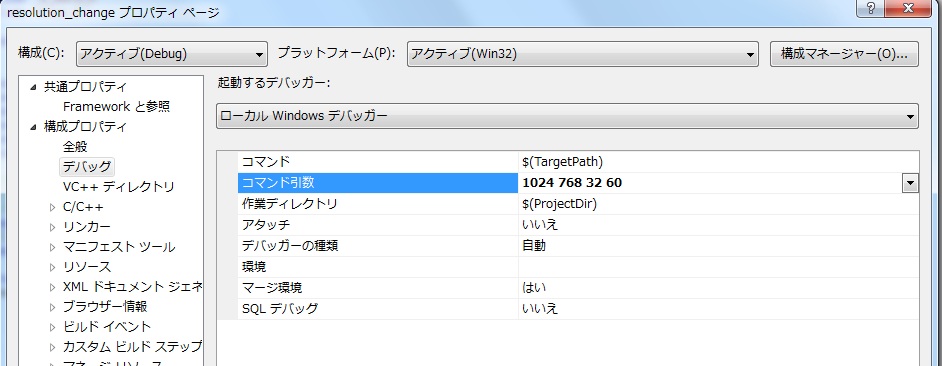
フォームFormにコマンドラインから引数を読み込むため、次のデバッグモードで使用する。
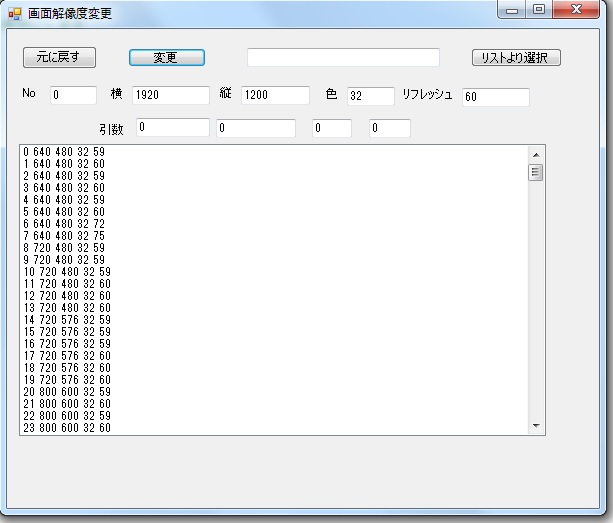
今回作るアプリケーション
コマンドラインから
resolution_change.exe 1024 768 32 60 で引数を渡すことができる
赤字は入力
// disp32form1.cpp : メイン プロジェクト ファイルです。
#include "stdafx.h"
#include "Form1.h"
using namespace disp32form1;
[STAThreadAttribute]
int main(array<System::String ^> ^args)
{
// コントロールが作成される前に、Windows XP ビジュアル効果を有効にします
Application::EnableVisualStyles();
Application::SetCompatibleTextRenderingDefault(false);
// メイン ウィンドウを作成して、実行します
Application::Run(gcnew Form1(args)); //argsを付ける
return 0;
}
d_data.cpp
#include "StdAfx.h"
#include "d_data.h"
d_data::d_data(void){
no=-1;
x_data=0;
y_data=0;
perpel=0;
hz=0;
}
d_data.h
#pragma once
ref class d_data
{
public:
d_data(void);
int no;
int x_data;
int y_data;
int perpel;
int hz;
};
disp.h
#pragma once
ref class disp
{
public:
DEVMODE* dispmode; // ディスプレイモード // ネイティブ・コードのクラス(※ポインタ)
static array<d_data^>^ disp_data; //参照クラスの配列の収納場所を作る
int old_no;
int old_x_data;
int old_y_data;
int old_perpel;
int old_hz;
int disp_end_no;
disp(void);
void disp_use(void);
void disp_old(void);
int disp_chang(int width_x,int height_y,int perpel,
int frequency_hz);
};
disp.cpp
#include "StdAfx.h"
#include "disp.h"
#include "d_data.h"
disp::disp(void)
{
static DEVMODE dispmode; // デバイス構造体
disp_data = gcnew array<d_data^> (1000); //参照クラスの配列の収納場所を作る
EnumDisplaySettings( NULL, ENUM_REGISTRY_SETTINGS, &dispmode ); // ディスプレイ解像度のレジストリ保存値を求める
old_x_data = dispmode.dmPelsWidth;
old_y_data = dispmode.dmPelsHeight;
old_perpel = dispmode.dmBitsPerPel;
old_hz = dispmode.dmDisplayFrequency;
}
void disp::disp_use(void)
{
//使用できるディスプレイモードの確認 配列に収納
static DEVMODE dispmode; // ディスプレイモード
int disp_no;
disp_no = 0;
while( TRUE )
{
//全モードの列挙
if( !EnumDisplaySettings( NULL, disp_no, &dispmode ) ) break;
// リッチテキストに表示する
disp_data[disp_no]=gcnew d_data; //重要 クラスの配列の中身の確保
disp_data[disp_no]->no = disp_no;
disp_data[disp_no]->x_data =dispmode.dmPelsWidth; // 解像度横サイズ(width x)
disp_data[disp_no]->y_data =dispmode.dmPelsHeight; // 解像度縦サイズ(hight y)
disp_data[disp_no]->perpel =dispmode.dmBitsPerPel; // 1ピクセル当たりのビット数
disp_data[disp_no]->hz =dispmode.dmDisplayFrequency; // リフレッシュ周波数
disp_end_no=disp_no;
disp_no++;
}
}
int disp::disp_chang(int width_x,int height_y,int perpel, int frequency_hz){
static DEVMODE dispmode; // デバイス構造体
HDC hdc; // 現在の色解像度を取得するためのデバイスコンテキスト
hdc = GetDC(NULL); // デバイス構造体を初期化する
ZeroMemory(&dispmode,sizeof(dispmode));
dispmode.dmSize = sizeof(dispmode);
dispmode.dmFields = DM_BITSPERPEL | DM_PELSWIDTH | DM_PELSHEIGHT;
dispmode.dmBitsPerPel = GetDeviceCaps(hdc,BITSPIXEL);
dispmode.dmPelsWidth = width_x; // 解像度横サイズ(width x)
dispmode.dmPelsHeight =height_y; // 解像度縦サイズ(hight y)
dispmode.dmBitsPerPel=perpel; // 1ピクセル当たりのビット数
dispmode.dmDisplayFrequency =frequency_hz; // リフレッシュ周波数
ReleaseDC(NULL,hdc);
// ディスプレイモードのチック合格なら解像度変更を行う。
if( ChangeDisplaySettings(&dispmode,CDS_TEST) == DISP_CHANGE_SUCCESSFUL ) {
ChangeDisplaySettings(&dispmode,CDS_FULLSCREEN);
return 0;
}
return 1;
}
void disp::disp_old(void){
static DEVMODE dispmode; // デバイス構造体
HDC hdc; // 現在の色解像度を取得するためのデバイスコンテキスト
hdc = GetDC(NULL); // デバイス構造体を初期化する
ZeroMemory(&dispmode,sizeof(dispmode));
dispmode.dmSize = sizeof(dispmode);
dispmode.dmFields = DM_BITSPERPEL | DM_PELSWIDTH | DM_PELSHEIGHT;
dispmode.dmBitsPerPel = GetDeviceCaps(hdc,BITSPIXEL);
dispmode.dmPelsWidth = old_x_data; // 解像度横サイズ(width x)
dispmode.dmPelsHeight =old_y_data; // 解像度縦サイズ(hight y)
dispmode.dmBitsPerPel=old_perpel; // 1ピクセル当たりのビット数
dispmode.dmDisplayFrequency =old_hz; // リフレッシュ周波数
ReleaseDC(NULL,hdc);
// ディスプレイモードのチック合格なら解像度変更を行う。
if( ChangeDisplaySettings(&dispmode,CDS_TEST) == DISP_CHANGE_SUCCESSFUL ) {
ChangeDisplaySettings(&dispmode,CDS_FULLSCREEN);}
}
Form1.hの入力
#pragma once
using namespace System::Diagnostics;
#include "d_data.h"
#include "disp.h"
namespace disp32form1 {
using namespace System;
using namespace System::ComponentModel;
using namespace System::Collections;
using namespace System::Windows::Forms;
using namespace System::Data;
using namespace System::Drawing;
/// <summary>
/// Form1 の概要
/// </summary>
public ref class Form1 : public System::Windows::Forms::Form
{
public:
// Form1(void)
array<System::String ^> ^Args_data;
Form1(array<System::String ^> ^args)//voiを変更
{
InitializeComponent();
//
//TODO: ここにコンストラクター コードを追加します
Args_data = args; // 追加
//EnableWindow(ListView_GetHeader(reinterpret_cast(this->
listView1->Handle.ToInt32())),FALSE);
//
}
protected:
/// <summary>
/// 使用中のリソースをすべてクリーンアップします。
/// </summary>
~Form1()
{
if (components)
{
delete components;
}
}
private: System::Windows::Forms::Button^ button1;
protected:
private: System::Windows::Forms::ListBox^ listBox1;
private: System::Windows::Forms::Button^ button2;
private: System::Windows::Forms::TextBox^ textBox2;
private:
/// <summary>
/// 必要なデザイナー変数です。
/// </summary>
System::ComponentModel::Container ^components;
private: System::Windows::Forms::TextBox^ textBox1;
private: System::Windows::Forms::TextBox^ textBox3;
private: System::Windows::Forms::TextBox^ textBox4;
private: System::Windows::Forms::TextBox^ textBox6;
private: System::Windows::Forms::TextBox^ textBox5;
private: System::Windows::Forms::Button^ button3;
private: System::Windows::Forms::Label^ label1;
private: System::Windows::Forms::Label^ label2;
private: System::Windows::Forms::Label^ label3;
private: System::Windows::Forms::Label^ label4;
private: System::Windows::Forms::Label^ label5;
private: System::Windows::Forms::TextBox^ textBox7;
private: System::Windows::Forms::TextBox^ textBox8;
private: System::Windows::Forms::TextBox^ textBox9;
private: System::Windows::Forms::TextBox^ textBox10;
private: System::Windows::Forms::Label^ label6;
static disp m_disp;
#pragma region Windows Form Designer generated code
/// <summary>
/// デザイナー サポートに必要なメソッドです。このメソッドの内容を
/// コード エディターで変更しないでください。
/// </summary>
void InitializeComponent(void)
{
this->button1 = (gcnew System::Windows::Forms::Button());
this->listBox1 = (gcnew System::Windows::Forms::ListBox());
this->button2 = (gcnew System::Windows::Forms::Button());
this->textBox2 = (gcnew System::Windows::Forms::TextBox());
this->textBox1 = (gcnew System::Windows::Forms::TextBox());
this->textBox3 = (gcnew System::Windows::Forms::TextBox());
this->textBox4 = (gcnew System::Windows::Forms::TextBox());
this->textBox5 = (gcnew System::Windows::Forms::TextBox());
this->textBox6 = (gcnew System::Windows::Forms::TextBox());
this->button3 = (gcnew System::Windows::Forms::Button());
this->label1 = (gcnew System::Windows::Forms::Label());
this->label2 = (gcnew System::Windows::Forms::Label());
this->label3 = (gcnew System::Windows::Forms::Label());
this->label4 = (gcnew System::Windows::Forms::Label());
this->label5 = (gcnew System::Windows::Forms::Label());
this->textBox7 = (gcnew System::Windows::Forms::TextBox());
this->textBox8 = (gcnew System::Windows::Forms::TextBox());
this->textBox9 = (gcnew System::Windows::Forms::TextBox());
this->textBox10 = (gcnew System::Windows::Forms::TextBox());
this->label6 = (gcnew System::Windows::Forms::Label());
this->SuspendLayout();
//
// button1
//
this->button1->Location = System::Drawing::Point(121, 19);
this->button1->Name = L"button1";
this->button1->Size = System::Drawing::Size(78, 19);
this->button1->TabIndex = 0;
this->button1->Text = L"変更";
this->button1->UseVisualStyleBackColor = true;
this->button1->Click += gcnew System::EventHandler(this, &Form1::button1_Click);
//
// listBox1
//
this->listBox1->FormattingEnabled = true;
this->listBox1->ItemHeight = 12;
this->listBox1->Location = System::Drawing::Point(12, 115);
this->listBox1->Name = L"listBox1";
this->listBox1->Size = System::Drawing::Size(527, 292);
this->listBox1->TabIndex = 2;
//
// button2
//
this->button2->Location = System::Drawing::Point(464, 19);
this->button2->Name = L"button2";
this->button2->Size = System::Drawing::Size(91, 19);
this->button2->TabIndex = 4;
this->button2->Text = L"リストより選択";
this->button2->UseVisualStyleBackColor = true;
this->button2->Click += gcnew System::EventHandler(this, &Form1::button2_Click);
//
// textBox2
//
this->textBox2->Location = System::Drawing::Point(240, 19);
this->textBox2->Name = L"textBox2";
this->textBox2->Size = System::Drawing::Size(193, 19);
this->textBox2->TabIndex = 5;
//
// textBox1
//
this->textBox1->Location = System::Drawing::Point(43, 57);
this->textBox1->Name = L"textBox1";
this->textBox1->Size = System::Drawing::Size(47, 19);
this->textBox1->TabIndex = 6;
//
// textBox3
//
this->textBox3->Location = System::Drawing::Point(125, 57);
this->textBox3->Name = L"textBox3";
this->textBox3->Size = System::Drawing::Size(78, 19);
this->textBox3->TabIndex = 7;
//
// textBox4
//
this->textBox4->Location = System::Drawing::Point(234, 57);
this->textBox4->Name = L"textBox4";
this->textBox4->Size = System::Drawing::Size(69, 19);
this->textBox4->TabIndex = 8;
//
// textBox5
//
this->textBox5->Location = System::Drawing::Point(340, 58);
this->textBox5->Name = L"textBox5";
this->textBox5->Size = System::Drawing::Size(48, 19);
this->textBox5->TabIndex = 9;
//
// textBox6
//
this->textBox6->Location = System::Drawing::Point(455, 59);
this->textBox6->Name = L"textBox6";
this->textBox6->Size = System::Drawing::Size(68, 19);
this->textBox6->TabIndex = 10;
//
// button3
//
this->button3->Location = System::Drawing::Point(15, 17);
this->button3->Name = L"button3";
this->button3->Size = System::Drawing::Size(75, 23);
this->button3->TabIndex = 11;
this->button3->Text = L"元に戻す";
this->button3->UseVisualStyleBackColor = true;
this->button3->Click += gcnew System::EventHandler(this, &Form1::button3_Click);
//
// label1
//
this->label1->AutoSize = true;
this->label1->Location = System::Drawing::Point(13, 58);
this->label1->Name = L"label1";
this->label1->Size = System::Drawing::Size(19, 12);
this->label1->TabIndex = 12;
this->label1->Text = L"No";
//
// label2
//
this->label2->AutoSize = true;
this->label2->Location = System::Drawing::Point(102, 59);
this->label2->Name = L"label2";
this->label2->Size = System::Drawing::Size(17, 12);
this->label2->TabIndex = 13;
this->label2->Text = L"横";
//
// label3
//
this->label3->AutoSize = true;
this->label3->Location = System::Drawing::Point(211, 58);
this->label3->Name = L"label3";
this->label3->Size = System::Drawing::Size(17, 12);
this->label3->TabIndex = 14;
this->label3->Text = L"縦";
//
// label4
//
this->label4->AutoSize = true;
this->label4->Location = System::Drawing::Point(317, 59);
this->label4->Name = L"label4";
this->label4->Size = System::Drawing::Size(17, 12);
this->label4->TabIndex = 15;
this->label4->Text = L"色";
//
// label5
//
this->label5->AutoSize = true;
this->label5->Location = System::Drawing::Point(395, 59);
this->label5->Name = L"label5";
this->label5->Size = System::Drawing::Size(54, 12);
this->label5->TabIndex = 16;
this->label5->Text = L"リフレッシュ";
//
// textBox7
//
this->textBox7->Location = System::Drawing::Point(129, 89);
this->textBox7->Name = L"textBox7";
this->textBox7->Size = System::Drawing::Size(74, 19);
this->textBox7->TabIndex = 17;
//
// textBox8
//
this->textBox8->Location = System::Drawing::Point(209, 90);
this->textBox8->Name = L"textBox8";
this->textBox8->Size = System::Drawing::Size(80, 19);
this->textBox8->TabIndex = 18;
//
// textBox9
//
this->textBox9->Location = System::Drawing::Point(305, 90);
this->textBox9->Name = L"textBox9";
this->textBox9->Size = System::Drawing::Size(40, 19);
this->textBox9->TabIndex = 19;
//
// textBox10
//
this->textBox10->Location = System::Drawing::Point(362, 90);
this->textBox10->Name = L"textBox10";
this->textBox10->Size = System::Drawing::Size(42, 19);
this->textBox10->TabIndex = 20;
//
// label6
//
this->label6->AutoSize = true;
this->label6->Location = System::Drawing::Point(91, 95);
this->label6->Name = L"label6";
this->label6->Size = System::Drawing::Size(29, 12);
this->label6->TabIndex = 21;
this->label6->Text = L"引数";
//
// Form1
//
this->AutoScaleDimensions = System::Drawing::SizeF(6, 12);
this->AutoScaleMode = System::Windows::Forms::AutoScaleMode::Font;
this->ClientSize = System::Drawing::Size(592, 479);
this->Controls->Add(this->label6);
this->Controls->Add(this->textBox10);
this->Controls->Add(this->textBox9);
this->Controls->Add(this->textBox8);
this->Controls->Add(this->textBox7);
this->Controls->Add(this->label5);
this->Controls->Add(this->label4);
this->Controls->Add(this->label3);
this->Controls->Add(this->label2);
this->Controls->Add(this->label1);
this->Controls->Add(this->button3);
this->Controls->Add(this->textBox6);
this->Controls->Add(this->textBox5);
this->Controls->Add(this->textBox4);
this->Controls->Add(this->textBox3);
this->Controls->Add(this->textBox1);
this->Controls->Add(this->textBox2);
this->Controls->Add(this->button2);
this->Controls->Add(this->listBox1);
this->Controls->Add(this->button1);
this->Name = L"Form1";
this->Text = L"画面解像度変更";
this->Load += gcnew System::EventHandler(this, &Form1::Form1_Load);
this->ResumeLayout(false);
this->PerformLayout();
}
#pragma endregion
private: System::Void button1_Click(System::Object^ sender, System::EventArgs^ e) {
// disp m_disp;
int width_x = int::Parse(textBox3->Text); // 解像度横サイズ(width x)
int height_y =int::Parse(textBox4->Text); // 解像度縦サイズ(hight y)
int perpel =int::Parse(textBox5->Text); // 解像度縦サイズ(hight y)
int frequency_hz =int::Parse(textBox6->Text); // リフレッシュ周波数
int y;
y=m_disp.disp_chang( width_x, height_y, perpel, frequency_hz);
if(y==1) MessageBox::Show("解像度変更失敗");
}
private: System::Void Form1_Load(System::Object^ sender, System::EventArgs^ e) {
//フォームへの引数の引き渡し 横 縦 色 リフレッシュ 例1028 768 32 60
int h_data0;
int h_data1;
int h_data2;
int h_data3;
if(Args_data->Length==4){
h_data0=int::Parse(Args_data[0]);
h_data1=int::Parse(Args_data[1]);
h_data2=int::Parse(Args_data[2]);
h_data3=int::Parse(Args_data[3]);
}else{ Args_data = gcnew array<String ^>(2);
Args_data[0] = "";}
//フォームへの引数の引き渡し終わり
//disp m_disp;
//現在のモード
textBox3->Text=m_disp.old_x_data.ToString();
textBox4->Text=m_disp.old_y_data.ToString();
textBox5->Text=m_disp.old_perpel.ToString();
textBox6->Text=m_disp.old_hz.ToString();
//引数
textBox7->Text=h_data0.ToString();
textBox8->Text=h_data1.ToString();
textBox9->Text=h_data2.ToString();
textBox10->Text=h_data3.ToString();
static DEVMODE dispmode; // デバイス構造体
//使用できるディスプレイモードの確認
m_disp.disp_use();
String^ text;
text="";
int disp_no=0;
/*-------------------
richTextBox1->SaveFile("C:\\dispmode.rtf"); 保存する場合
richTextBox1->LoadFile("C:\\dispmode.rtf");
-------------------*/
// 使用できるディスプレイモードをリストボックスに表示
disp_no = 0;
int flag=0;
int y;
//while( TRUE )
// while(m_disp.disp_data[disp_no]->no = -1)
for(disp_no=0;disp_no<=m_disp.disp_end_no;disp_no++)
{
//全モードの列挙
//if( m_disp.disp_data[disp_no]->no==-1 ) break;
// リッチテキストに表示する
text=disp_no.ToString()+" "+m_disp.disp_data[disp_no]->x_data.ToString()+" "+m_disp.disp_data[disp_no]->y_data.ToString()+
" "+m_disp.disp_data[disp_no]->perpel.ToString()+" "+m_disp.disp_data[disp_no]->hz.ToString()+"\n";
listBox1->Items->Add(text);
//フォームへの引数が解像度と適合しているかのチェック
if( m_disp.disp_data[disp_no]->x_data==h_data0 &&
m_disp.disp_data[disp_no]->y_data==h_data1 &&
m_disp.disp_data[disp_no]->perpel==h_data2 &&
m_disp.disp_data[disp_no]->hz==h_data3) flag=1;
// disp_no++;
}
textBox1->Text=flag.ToString();
//フォームへの引数の引き渡しがあったときの処理
if(flag==1) y=m_disp.disp_chang( h_data0,h_data1,h_data2,h_data3); //フォームへの引数で解像度変更
if(y==1) MessageBox::Show("解像度変更失敗");
}
private: System::Void button2_Click(System::Object^ sender, System::EventArgs^ e) {
// disp m_disp;
int s_no=0;
textBox2->Text=listBox1->Text;
textBox1->Text=listBox1->SelectedIndex.ToString();
s_no=listBox1->SelectedIndex;
textBox3->Text=m_disp.disp_data[s_no]->x_data.ToString();
textBox4->Text=m_disp.disp_data[s_no]->y_data.ToString();
textBox5->Text=m_disp.disp_data[s_no]->perpel.ToString();
textBox6->Text=m_disp.disp_data[s_no]->hz.ToString();
}
private: System::Void button3_Click(System::Object^ sender, System::EventArgs^ e) {
m_disp.disp_old();
}
};
}



