


Excel に付属する Visual Basic Editer
9日目
トランプゲームを作る
�� ポーカーゲーム トランプ表示
ゲーム説明
簡単なプログラムを作れるように解説します
ここではミニプログラムの作成過程を体験してください。
�ぁ〕霓�1-52の変換をしたデーターのトランプ表示
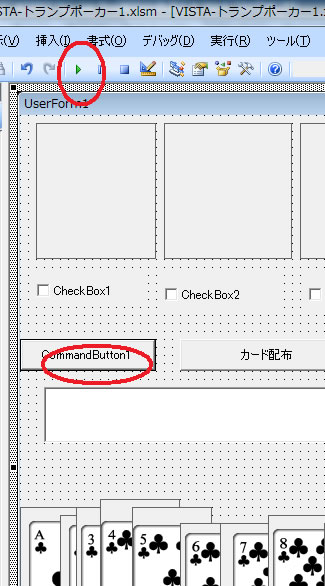
コマンドボタン1と2をクリックして 赤を入力 緑は入力済み
Dim card(52), z, keta(10), yaku(5), tokuten, start_flag
Rem 乱数
Private Sub CommandButton1_Click()
y = 1
Do While y < 11
x = Int(Rnd() * 52) + 1
flag = 0
For z = 1 To 10
If card(z) = x Then flag = 1
Next z
If flag = 0 Then
card(y) = x
y = y + 1
End If
Loop
For y = 1 To 52
Cells(y, 1) = card(y)
Next y
For y = 1 To 52
If card(y) > 13 And card(y) <= 26 Then card(y) = card(y) + 100 - 13
If card(y) > 26 And card(y) <= 39 Then card(y) = card(y) + 200 - 26
If card(y) > 39 And card(y) <= 52 Then card(y) = card(y) + 300 - 39
Cells(y, 2) = card(y)
Next y
Image54.Picture = Image53.Picture
Image55.Picture = Image53.Picture
Image56.Picture = Image53.Picture
Image57.Picture = Image53.Picture
Image58.Picture = Image53.Picture
End Sub
Private Sub card_hai()
If z = 1 Then Image59.Picture = Image1.Picture
If z = 2 Then Image59.Picture = Image2.Picture
If z = 3 Then Image59.Picture = Image3.Picture
If z = 4 Then Image59.Picture = Image4.Picture
If z = 5 Then Image59.Picture = Image5.Picture
If z = 6 Then Image59.Picture = Image6.Picture
If z = 7 Then Image59.Picture = Image7.Picture
If z = 8 Then Image59.Picture = Image8.Picture
If z = 9 Then Image59.Picture = Image9.Picture
If z = 10 Then Image59.Picture = Image10.Picture
If z = 11 Then Image59.Picture = Image11.Picture
If z = 12 Then Image59.Picture = Image12.Picture
If z = 13 Then Image59.Picture = Image13.Picture
If z = 101 Then Image59.Picture = Image14.Picture
If z = 102 Then Image59.Picture = Image15.Picture
If z = 103 Then Image59.Picture = Image16.Picture
If z = 104 Then Image59.Picture = Image17.Picture
If z = 105 Then Image59.Picture = Image18.Picture
If z = 106 Then Image59.Picture = Image19.Picture
If z = 107 Then Image59.Picture = Image20.Picture
If z = 108 Then Image59.Picture = Image21.Picture
If z = 109 Then Image59.Picture = Image22.Picture
If z = 110 Then Image59.Picture = Image23.Picture
If z = 111 Then Image59.Picture = Image24.Picture
If z = 112 Then Image59.Picture = Image25.Picture
If z = 113 Then Image59.Picture = Image26.Picture
If z = 201 Then Image59.Picture = Image27.Picture
If z = 202 Then Image59.Picture = Image28.Picture
If z = 203 Then Image59.Picture = Image29.Picture
If z = 204 Then Image59.Picture = Image30.Picture
If z = 205 Then Image59.Picture = Image31.Picture
If z = 206 Then Image59.Picture = Image32.Picture
If z = 207 Then Image59.Picture = Image33.Picture
If z = 208 Then Image59.Picture = Image34.Picture
If z = 209 Then Image59.Picture = Image35.Picture
If z = 210 Then Image59.Picture = Image36.Picture
If z = 211 Then Image59.Picture = Image37.Picture
If z = 212 Then Image59.Picture = Image38.Picture
If z = 213 Then Image59.Picture = Image39.Picture
If z = 301 Then Image59.Picture = Image40.Picture
If z = 302 Then Image59.Picture = Image41.Picture
If z = 303 Then Image59.Picture = Image42.Picture
If z = 304 Then Image59.Picture = Image43.Picture
If z = 305 Then Image59.Picture = Image44.Picture
If z = 306 Then Image59.Picture = Image45.Picture
If z = 307 Then Image59.Picture = Image46.Picture
If z = 308 Then Image59.Picture = Image47.Picture
If z = 309 Then Image59.Picture = Image48.Picture
If z = 310 Then Image59.Picture = Image49.Picture
If z = 311 Then Image59.Picture = Image50.Picture
If z = 312 Then Image59.Picture = Image51.Picture
If z = 313 Then Image59.Picture = Image52.Picture
End Sub
Private Sub disp()
z = card(1)
Call card_hai
Image54.Picture = Image59.Picture
z = card(2)
Call card_hai
Image55.Picture = Image59.Picture
z = card(3)
Call card_hai
Image56.Picture = Image59.Picture
z = card(4)
Call card_hai
Image57.Picture = Image59.Picture
z = card(5)
Call card_hai
Image58.Picture = Image59.Picture
End Sub
Private Sub CommandButton2_Click()
Call disp
End Sub
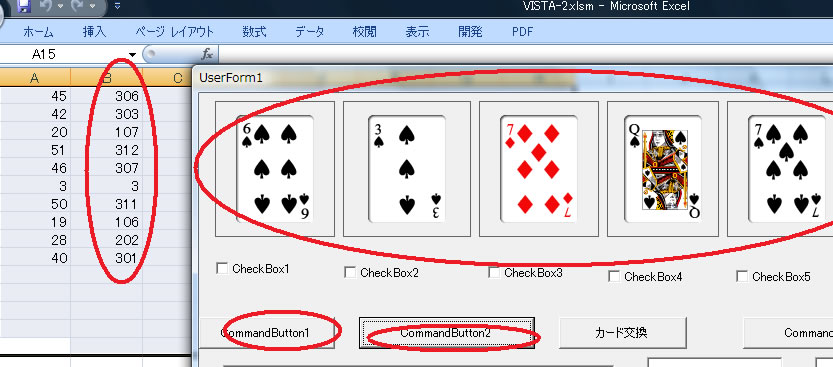
306 はスペードの6になっている
1番台 クローバ
100番台 ダイヤ
200番台 ハート
300番台 スペード



