


Excel に付属する Visual Basic Editer
13日目
トランプゲームを作る midi音楽を鳴らす
�� ポーカーゲーム をリンクする
ゲーム説明
簡単なプログラムを作れるように解説します
ここではミニプログラムの作成過程を体験してください。
�─�midi音楽を鳴らす
Excel 2008の方は次のファイルdorectxを解凍してexcel_dx8.batを管理者として実行してください。
詳しくは インターネットで調べてください。
midiとecxelのデーターは同じディレクトリに入れてください。 見本 midを解凍して実行してください
尚midiファンファーレの著作権はnatoriにあります。
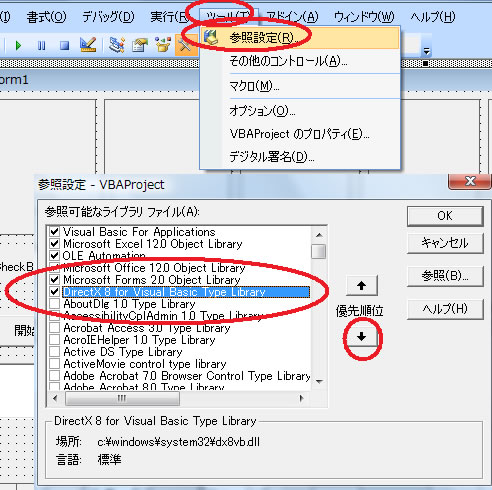
設定 directx8を指定します。
ツール 参照設定 directx8 for にレ点を入れる。
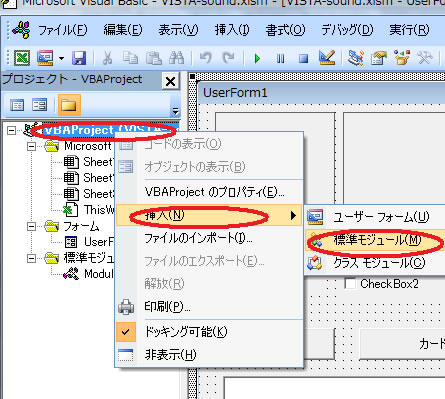
vbaprojectで右クリック 挿入 標準モジュール
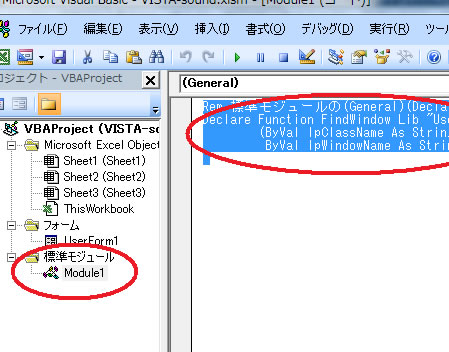
module1に次を入れる
Rem 標準モジュールの(General)(Declarations)へ記述します
Declare Function FindWindow Lib "User32.dll" Alias "FindWindowA" _
(ByVal lpClassName As String, _
ByVal lpWindowName As String) As Long
Form1をクリックしbotton1をクリックしてから先頭に
Dim card(52), z, keta(10), yaku(5), tokuten, start_flag
Dim DirectXD8 As New DirectX8
Dim DirectSoundD8 As DirectSound8
Dim BufferSoundTestD As DirectSoundSecondaryBuffer8
Dim BufferDirectSoundC As DSBUFFERDESC
Dim DirectMyWindow As Long
Dim WorkSoundFiles As String
Dim WorkSoundFiles2 As String
Dim BuferfBgmTest As DirectMusicPerformance8
Dim DirectXMLoader As DirectMusicLoader8
Dim DirectMSegment As DirectMusicSegment8
Dim DirectMSegmentState As DirectMusicSegmentState8
Dim AudioParam As DMUS_AUDIOPARAMS
Private Sub CommandButton1_Click()
Call StartMidi
一番下へ
Private Sub CommandButton4_Click()
card(1) = 2
card(2) = 3
card(3) = 4
card(4) = 5
card(5) = 6
End Sub
Public Sub ReadMusicBuffer()
DirectMyWindow = FindWindow("XLMAIN", Application.Caption)
WorkSoundFiles = ThisWorkbook.Path & "\test1.mid"
Set DirectXMLoader = DirectXD8.DirectMusicLoaderCreate()
Set DirectMSegment = DirectXMLoader.LoadSegment(WorkSoundFiles)
DirectMSegment.SetStartPoint mtStart:=0
DirectMSegment.SetRepeats lRepeats:=0
Set BuferfBgmTest = DirectXD8.DirectMusicPerformanceCreate()
BuferfBgmTest.InitAudio Hwnd:=DirectMyWindow, _
lFlags:=DMUS_AUDIOF_ALL, _
audioparams:=AudioParam, _
DirectSound:=Nothing, _
lDefaultPathType:=DMUS_APATH_DYNAMIC_3D, _
lPChannelCount:=16
BuferfBgmTest.SetMasterAutoDownload b:=True
End Sub
Public Sub ReadMusicBuffer2()
DirectMyWindow = FindWindow("XLMAIN", Application.Caption)
WorkSoundFiles2 = ThisWorkbook.Path & "\test2.mid"
Set DirectXMLoader = DirectXD8.DirectMusicLoaderCreate()
Set DirectMSegment = DirectXMLoader.LoadSegment(WorkSoundFiles2)
DirectMSegment.SetStartPoint mtStart:=0
DirectMSegment.SetRepeats lRepeats:=0
Set BuferfBgmTest = DirectXD8.DirectMusicPerformanceCreate()
BuferfBgmTest.InitAudio Hwnd:=DirectMyWindow, _
lFlags:=DMUS_AUDIOF_ALL, _
audioparams:=AudioParam, _
DirectSound:=Nothing, _
lDefaultPathType:=DMUS_APATH_DYNAMIC_3D, _
lPChannelCount:=16
BuferfBgmTest.SetMasterAutoDownload b:=True
End Sub
Public Sub StartMidi()
Call ReadMusicBuffer
Set DirectMSegmentState = BuferfBgmTest.PlaySegmentEx(DirectMSegment, 0, 0)
End Sub
Public Sub StopMidi()
BuferfBgmTest.StopEx ObjectToStop:=DirectMSegmentState, lStopTime:=0, lFlags:=0
End Sub
Public Sub StartMidi2()
Call ReadMusicBuffer2
Set DirectMSegmentState = BuferfBgmTest.PlaySegmentEx(DirectMSegment, 0, 0)
End Sub
Private Sub CommandButton5_Click()
Call StartMidi
End Sub
Private Sub CommandButton6_Click()
Call StartMidi2
End Sub
Private Sub UserForm_Click()
Call StopMidi
End Sub
自分で音楽の鳴らしたいとこる
たとえば 3カードの後に
Call StartMidi2 といれる【ファンファーレ】
これで完成である



