


Visual Studio 2008 Express Edition でトランプゲームを作ろう
4日目の学習
��Form1に
テキストボックス1と2チックボックスとボタンを追加する

��Form1デザイン→ checkBoxチェクボックス1から5をダブルクリックして赤字を追加
private: System::Void checkBox1_CheckedChanged(System::Object^ sender, System::EventArgs^ e) {
hoji1=1;
}
private: System::Void checkBox2_CheckedChanged(System::Object^ sender, System::EventArgs^ e) {
hoji2=1;
}
private: System::Void checkBox3_CheckedChanged(System::Object^ sender, System::EventArgs^ e) {
hoji3=1;
}
private: System::Void checkBox4_CheckedChanged(System::Object^ sender, System::EventArgs^ e) {
hoji4=1;
}
private: System::Void checkBox5_CheckedChanged(System::Object^ sender, System::EventArgs^ e) {
hoji5=1;
}
��Form1デザイン→ ボタン2をダブルクリックして赤字を追加
private: System::Void button2_Click(System::Object^ sender, System::EventArgs^ e) {
if(start_flag==1){
int nohai;
int xx=6;
int x,y,w;
char buf[80];
/*
テキストボックス入力を読み取るには、
String^ string1=textBox1->Text;
テキストボックスに表示するには、
textBox1->Text=string1;
*/
String^ string1= "ブタです";
textBox1->Text=string1;
if (hoji1==0){hai[1]=card[xx]; xx++;}
if (hoji2==0){hai[2]=card[xx]; xx++;}
if (hoji3==0){hai[3]=card[xx]; xx++;}
if (hoji4==0){hai[4]=card[xx]; xx++;}
if (hoji5==0){hai[5]=card[xx]; }
for(xx=1;xx<6;xx++){
nohai=hai[xx];
DispHai(nohai,xx);
} //end for
start_flag=2;
} //end if start_flag==1
}
��Form1デザイン→ ボタン3をダブルクリックして赤字を追加
private: System::Void button3_Click(System::Object^ sender, System::EventArgs^ e) {
if (start_flag==2){
int nohai;
int xx;
for(xx=1;xx<6;xx++){
nohai=0;
DispHai(nohai,xx);
}
start_flag=0;
}
}
//Rem フラッシュ
int club = 0;
int daiya = 0;
int hart = 0;
int supedo = 0;
int flash = 0;
for(x=1;x<6;x++){
if( hai[x] > 0 && hai[x] <= 13) {supedo = supedo + 1;}
if( hai[x] > 100 && hai[x] <= 113 ) {club=club + 1;}
if( hai[x] > 200 && hai[x] <= 213 ) {daiya = daiya + 1;}
if( hai[x] > 300 && hai[x] <= 313 ) {hart = hart + 1;}
} //Next x
if( club == 5){
string1= "クラブのフラッシュ";
flash = 1;
tokuten = tokuten + 509;
} //End If clab
if (daiya == 5){
string1= "ダイヤのフラッシュ";
flash = 1;
tokuten = tokuten + 509;
} //End If daiya
if( hart == 5 ){
string1= "ハートのフラッシュ";
flash = 1;
tokuten = tokuten + 509;
} //End If hart
if( supedo == 5){
string1= "スペードのフラッシュ";
flash = 1;
tokuten = tokuten + 509;
} //End If supedo
textBox1->Text=string1;
//文字で数を確認
sprintf_s(buf,80,"supedo=%3d club=%3d daiy=%3d hart=%3d",supedo,club,daiya,hart);
string1=gcnew String(buf);
textBox5->Text=string1;
//文字で確認終了
//Rem フラッシュend
//Rem ペアー
int twopai = 0;
int threepai = 0;
int oitoku;
for(x=6;x<11;x++){
keta[x] = 0;
} //Next x
for(x=1;x<6;x++){
y=hai[x];
if(hai[x]>100) y=hai[x]-100;
if(hai[x]>200) y=hai[x]-200;
if(hai[x]>300) y=hai[x]-300;
keta[x]=y;
} //Next x
for(x=1;x<6;x++){
yaku[x] = 0;
for(w=1;w<6;w++){
if( keta[x] == keta[w]) yaku[x] = yaku[x] + 1;
} //Next w
} //Next x
for(x=1;x<6;x++){
if( yaku[x]== 2) twopai = twopai + 1;
if( yaku[x]== 3) threepai = 1;
if( yaku[x]== 4){
string1 = "フォーカード";
tokuten = tokuten + 4165;
} //End if( yaku[x]== 4)
} //Next x
if( twopai == 2 ){
string1 = "ワンペーア";
tokuten = tokuten + 3;
} //End If( twopai == 2 )
if( twopai == 4 ){
string1 = "ツーペーア";
tokuten = tokuten + 21;
} //End If( twopai == 4 )
if( threepai == 1){
string1 = "スリーカード";
tokuten = tokuten + 47;
} //End If( threepai == 1)
if( twopai == 2 && threepai == 1){
string1 = "フルハウス";
tokuten = tokuten + 694;
} //End If
textBox1->Text=string1;
//Rem ペアーend
//Rem ストレート
for(x=1;x<6;x++){
for(y=1;y<6;y++){
if( keta[x] < keta[y]){
oitoku = keta[x];
keta[x] = keta[y];
keta[y] = oitoku;
} //End If
} //Next y
} //Next x
if (keta[1] == 1){
for(x=1;x<6;x++){
if( keta[x] = x) keta[x + 5] = keta[x] + 13;
}// Next x
}//End if (keta[1] == 1)
int flag = 0;
for(x=1;x<10;x++){
if (keta[x] == keta[x + 1] - 1) flag = flag + 1;
} //Next x
if( flag >= 4){
string1 = string1 + " ストレート";
tokuten = tokuten + 255;
if( flash == 1) tokuten = tokuten + 72193 - 255;
if( flash == 1 && flag >= 4 && keta[1] == 1 && keta[5] == 13){
string1 = "ローヤルストレートフラッシュ";
tokuten = tokuten + 649740;
} //End If
//TextBox2 = tokuten
} //End If
textBox1->Text=string1;
//Rem ストレートend
textBox2->Text=tokuten.ToString(); //数値から文字列への変換には、
//textBox2->Text=string2;
start_flag=2;
} //end if start_flag==1
}
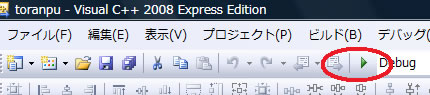
を押して実行してみる
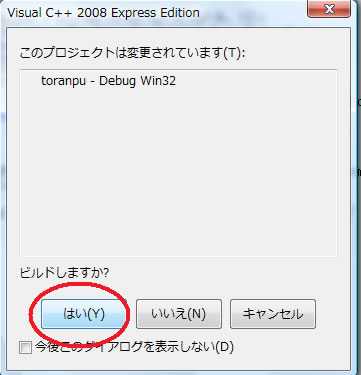
結果
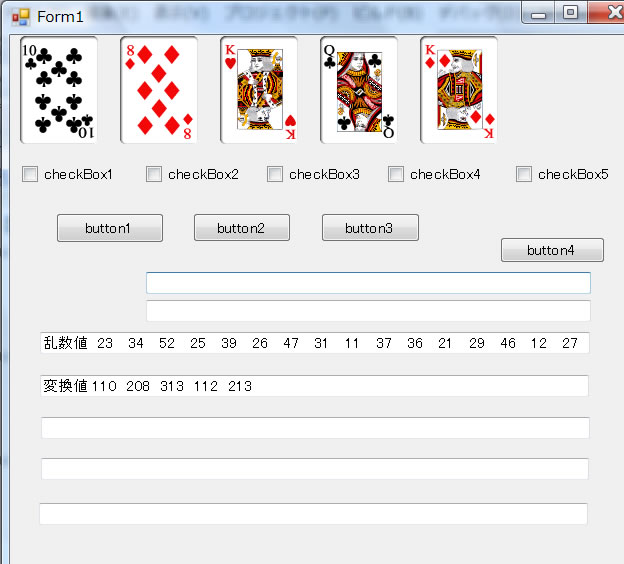
これが表示されれば成功です



