


Visual Studio 2008 Express Edition でトランプゲームを作ろう
8日目 VBAのリストをC++に変換してみよう
2日目の学習
から再スタート
復習
この�.襦璽船鵑肇椒織鵤院´△瞭睛討�必要です。
//��
static int card[55];
static int hai[12];
static int keta[12];
static int yaku[12];
static int start_flag=0;
static int hoji1=0;
static int hoji2=0;
static int hoji3=0;
static int hoji4=0;
static int hoji5=0;
static int tokuten=0;
void DispHai( int nohai,int xx){
Graphics^ gr=this->CreateGraphics();
int X0=10,Y0=1;
String^ filename;
filename="c:\\card\\1_sp.gif";
if(nohai==0 ) filename="c:\\card\\0_r1.gif" ;
//Pen^ pen1=gcnew Pen(col);
if(nohai>0 && nohai<14) filename="c:\\card\\"+nohai+"_sp.gif" ;
if(nohai>100 && nohai<114 ){nohai=nohai-100;
filename="c:\\card\\"+nohai+"_cl.gif" ;}
if(nohai>200 && nohai<214 ){nohai=nohai-200;
filename="c:\\card\\"+nohai+"_di.gif" ;}
if(nohai>300 && nohai<314){nohai=nohai-300;
filename="c:\\card\\"+nohai+"_he.gif" ;}
//原画像を左上に描画する
if(xx==1){
Bitmap^ bmap1; //bmap1の確保
bmap1=gcnew Bitmap(filename);
gr->DrawImage(bmap1,X0,Y0);
}
if(xx==2){
Bitmap^ bmap2; //bmap2の確保
bmap2=gcnew Bitmap(filename);
gr->DrawImage(bmap2,X0+100,Y0);
}
if(xx==3){
Bitmap^ bmap3; //bmap3の確保
bmap3=gcnew Bitmap(filename);
gr->DrawImage(bmap3,X0+200,Y0);
}
if(xx==4){
Bitmap^ bmap4; //bmap4の確保
bmap4=gcnew Bitmap(filename);
gr->DrawImage(bmap4,X0+300,Y0);
}
if(xx==5){
Bitmap^ bmap5; //bmap5の確保
bmap5=gcnew Bitmap(filename);
gr->DrawImage(bmap5,X0+400,Y0);
}
}
//��
private: System::Void button1_Click(System::Object^ sender, System::EventArgs^ e) {
if(start_flag ==0){ //一度通過したら度目を禁止する
int amax,xrand,nohai;
int xx,yy,y;
char buf[80];
Graphics^ gr=this->CreateGraphics();
String^ string1;
Brush^ brush=gcnew SolidBrush(Color::Black);
System::Drawing::Font^ font=gcnew System::Drawing::Font("MS ゴシック",10);
Random^ rand=gcnew Random(); //で乱数randを生成しておき、
//2) 以上int amax未満の乱数を発生したい場合には、
amax=52;
for(xx=1;xx<54;xx++) card[xx]=0;
yy=1;
while(yy<20){
xrand=rand->Next(amax)+1;
int flag=0;
for(xx=1;xx<53;xx++) {if(card[xx]==xrand) flag=1;}
if(flag==0){ card[yy]=xrand;
//文字で確認
sprintf_s(buf,80," %3d ",xrand);
string1=gcnew String(buf);
gr->DrawString(string1,font,brush,(float)16*yy,(float)300);
//文字で確認終了
yy++;}
}
for(y=1;y<53;y++){
if( card[y] > 13 && card[y] <= 26) card[y] = card[y] + 100 - 13;
if( card[y] > 26 && card[y] <= 39) card[y] = card[y] + 200 - 26;
if( card[y] > 39 && card[y] <= 52) card[y] = card[y] + 300 - 39;
} //end for y
for(xx=1;xx<6;xx++){
hai[xx]=card[xx];
}
for(xx=1;xx<6;xx++){
nohai=hai[xx];
DispHai(nohai,xx);
}
//次のように変更 青を赤に
for(xx=1;xx<6;xx++){
DispHai(0,xx);
}
hoji1=0;
hoji2=0;
hoji3=0;
hoji4=0;
hoji5=0;
start_flag=1; //一度通過したら度目を禁止するフラッグ
}//end if start_flag=1;一度通過したら度目を禁止する
}
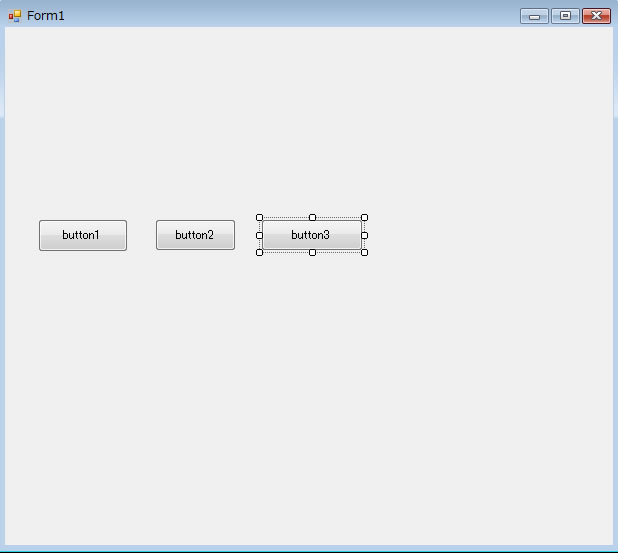
ボタン2をクリックして
次のようにカードの表示をするようにします
basicの内容【緑】を次のように変更する【赤】
緑の部分から同じ所を切り取る
| basic | c++ |
End Sub Private Sub disp() End Sub Private Sub CommandButton2_Click() End Sub |
private: System::Void button2_Click(System::Object^ sender, System::EventArgs^ e) {
|
参考
void DispHai( int nohai,int xx){
Graphics^ gr=this->CreateGraphics();
int X0=10,Y0=1;
String^ filename;
filename="c:\\card\\1_sp.gif";
if(nohai==0 ) filename="c:\\card\\0_r1.gif" ;
//Pen^ pen1=gcnew Pen(col);
if(nohai>0 && nohai<14) filename="c:\\card\\"+nohai+"_sp.gif" ;
if(nohai>100 && nohai<114 ){nohai=nohai-100;
filename="c:\\card\\"+nohai+"_cl.gif" ;}
if(nohai>200 && nohai<214 ){nohai=nohai-200;
filename="c:\\card\\"+nohai+"_di.gif" ;}
if(nohai>300 && nohai<314){nohai=nohai-300;
filename="c:\\card\\"+nohai+"_he.gif" ;}
//原画像を左上に描画する
if(xx==1){
Bitmap^ bmap1; //bmap1の確保
bmap1=gcnew Bitmap(filename);
gr->DrawImage(bmap1,X0,Y0);
}
if(xx==2){
Bitmap^ bmap2; //bmap2の確保
bmap2=gcnew Bitmap(filename);
gr->DrawImage(bmap2,X0+100,Y0);
}
if(xx==3){
Bitmap^ bmap3; //bmap3の確保
bmap3=gcnew Bitmap(filename);
gr->DrawImage(bmap3,X0+200,Y0);
}
if(xx==4){
Bitmap^ bmap4; //bmap4の確保
bmap4=gcnew Bitmap(filename);
gr->DrawImage(bmap4,X0+300,Y0);
}
if(xx==5){
Bitmap^ bmap5; //bmap5の確保
bmap5=gcnew Bitmap(filename);
gr->DrawImage(bmap5,X0+400,Y0);
}
}
private: System::Void Form1_Paint(System::Object^ sender, System::Windows::Forms::PaintEventArgs^ e) {
Graphics^ gr=e->Graphics;
}
private: System::Void button1_Click(System::Object^ sender, System::EventArgs^ e) {
if(start_flag ==0){ //一度通過したら度目を禁止する
int amax,xrand,nohai;
int xx,yy,y;
char buf[80];
Graphics^ gr=this->CreateGraphics();
String^ string1;
Brush^ brush=gcnew SolidBrush(Color::Black);
System::Drawing::Font^ font=gcnew System::Drawing::Font("MS ゴシック",10);
Random^ rand=gcnew Random(); //で乱数randを生成しておき、
//2) 以上int amax未満の乱数を発生したい場合には、
amax=52;
for(xx=1;xx<54;xx++) card[xx]=0;
yy=1;
while(yy<20){
xrand=rand->Next(amax)+1;
int flag=0;
for(xx=1;xx<53;xx++) {if(card[xx]==xrand) flag=1;}
if(flag==0){ card[yy]=xrand;
//文字で確認
sprintf_s(buf,80," %3d ",xrand);
string1=gcnew String(buf);
gr->DrawString(string1,font,brush,(float)16*yy,(float)300);
//文字で確認終了
yy++;}
}
for(y=1;y<53;y++){
if( card[y] > 13 && card[y] <= 26) card[y] = card[y] + 100 - 13;
if( card[y] > 26 && card[y] <= 39) card[y] = card[y] + 200 - 26;
if( card[y] > 39 && card[y] <= 52) card[y] = card[y] + 300 - 39;
} //end for y
for(xx=1;xx<6;xx++){
DispHai(0,xx);
}
hoji1=0;
hoji2=0;
hoji3=0;
hoji4=0;
hoji5=0;
start_flag=1; //一度通過したら度目を禁止するフラッグ
}//end if start_flag=1;一度通過したら度目を禁止する
}
private: System::Void button2_Click(System::Object^ sender, System::EventArgs^ e) {
int xx;
for(xx=1;xx<6;xx++){
DispHai(card[xx],xx);
}
実際のsample sample4.exe sample4.zip



