


Visual Studio 2010 Express Edition で迷路を作ろう
�� クラスとして2次元配列を利用し子ウインドウからも参照させる
子ウインドウ【子フォーム 、 子Form】 の作り方
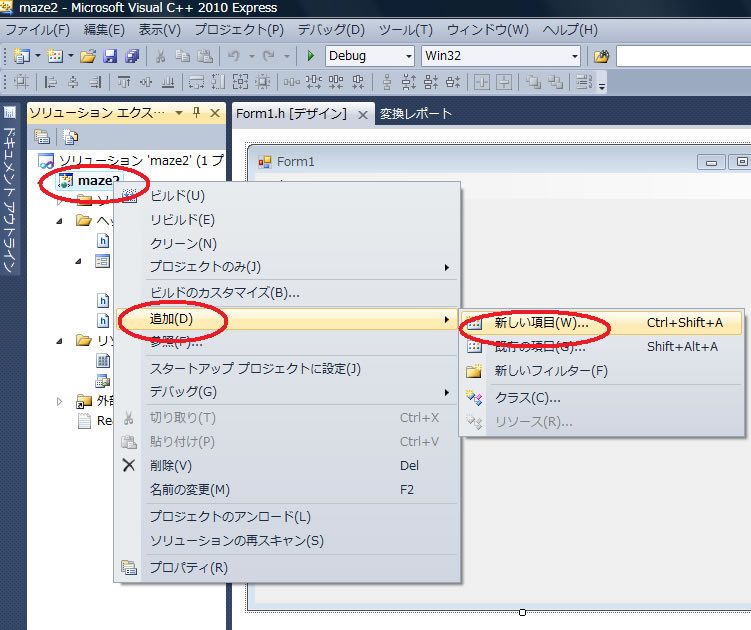
子ウインドウの呼び出し方
自分で定義したFormの名前koFormとする
koForm^ kfm=gcnew koForm();
kfm->ShowDialog();
クラスの作り方

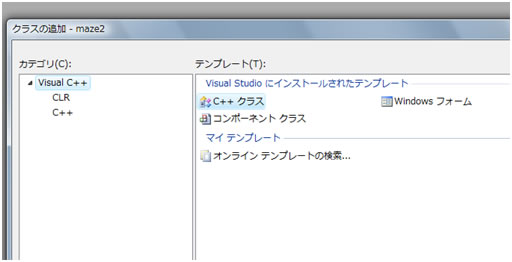
追加 新しい項目 コンポーネントクラス data としてdata クラスを作る
data.hの中身
#pragma once
ref class data
{
public:
data(void);
static array<int ,2>^ map_data=gcnew array<int,2>(17,17);
};
data.CPPの中身
#include "StdAfx.h"
#include "data.h"
data::data(void)
{
for(int i;i<17;i++){
for(int j;j<17;j++){
map_data[i,j]=0;
}
}
}
初期値を代入する場合の書式
static array<int ,2>^ map_data=gcnew array<int,2>{{1,2,3},{3,4,6}};
static array<int ,2>^ map_data=gcnew array<int,2>(3,3){{1,2,3},{3,4,6}};
�� Form.h の例 赤字が入力
#pragma once
#include "data.h"
namespace maze2 {
using namespace System;
using namespace System::ComponentModel;
using namespace System::Collections;
using namespace System::Windows::Forms;
using namespace System::Data;
using namespace System::Drawing;
/// <summary>
/// Form1 の概要
///
/// 警告: このクラスの名前を変更する場合、このクラスが依存するすべての .resx ファイルに関連付けられた
/// マネージ リソース コンパイラ ツールに対して 'Resource File Name' プロパティを
/// 変更する必要があります。この変更を行わないと、
/// デザイナと、このフォームに関連付けられたローカライズ済みリソースとが、
/// 正しく相互に利用できなくなります。
/// </summary>
public ref class Form1 : public System::Windows::Forms::Form
{
public:
Form1(void)
{
InitializeComponent();
//
//TODO: ここにコンストラクタ コードを追加します
//
}
private: System::Windows::Forms::MenuStrip^ menuStrip1;
private: System::Windows::Forms::ToolStripMenuItem^ filesToolStripMenuItem;
private: System::Windows::Forms::ToolStripMenuItem^ lOadToolStripMenuItem;
private: System::Windows::Forms::OpenFileDialog^ openFileDialog1;
//------------------------------------
public:
static int X0=17,Y0=17;
array<int ,2>^ data;
//------------------------------------
protected:
/// <summary>
/// 使用中のリソースをすべてクリーンアップします。
/// </summary>
~Form1()
{
if (components)
{
delete components;
}
}
private:
/// <summary>
/// 必要なデザイナ変数です。
/// </summary>
System::ComponentModel::Container ^components;
#pragma region Windows Form Designer generated code
/// <summary>
/// デザイナ サポートに必要なメソッドです。このメソッドの内容を
/// コード エディタで変更しないでください。
/// </summary>
void InitializeComponent(void)
{
this->menuStrip1 = (gcnew System::Windows::Forms::MenuStrip());
this->filesToolStripMenuItem = (gcnew System::Windows::Forms::ToolStripMenuItem());
this->lOadToolStripMenuItem = (gcnew System::Windows::Forms::ToolStripMenuItem());
this->openFileDialog1 = (gcnew System::Windows::Forms::OpenFileDialog());
this->menuStrip1->SuspendLayout();
this->SuspendLayout();
//
// menuStrip1
//
this->menuStrip1->Items->AddRange(gcnew cli::array< System::Windows::Forms::ToolStripItem^ >(1) {this->filesToolStripMenuItem});
this->menuStrip1->Location = System::Drawing::Point(0, 0);
this->menuStrip1->Name = L"menuStrip1";
this->menuStrip1->Size = System::Drawing::Size(535, 26);
this->menuStrip1->TabIndex = 0;
this->menuStrip1->Text = L"menuStrip1";
//
// filesToolStripMenuItem
//
this->filesToolStripMenuItem->DropDownItems->AddRange(gcnew cli::array< System::Windows::Forms::ToolStripItem^ >(1) {this->lOadToolStripMenuItem});
this->filesToolStripMenuItem->Name = L"filesToolStripMenuItem";
this->filesToolStripMenuItem->Size = System::Drawing::Size(46, 22);
this->filesToolStripMenuItem->Text = L"Files";
//
// lOadToolStripMenuItem
//
this->lOadToolStripMenuItem->Name = L"lOadToolStripMenuItem";
this->lOadToolStripMenuItem->Size = System::Drawing::Size(152, 22);
this->lOadToolStripMenuItem->Text = L"Load";
this->lOadToolStripMenuItem->Click += gcnew System::EventHandler(this, &Form1::lOadToolStripMenuItem_Click);
//
// openFileDialog1
//
this->openFileDialog1->FileName = L"openFileDialog1";
//
// Form1
//
this->AutoScaleDimensions = System::Drawing::SizeF(6, 12);
this->AutoScaleMode = System::Windows::Forms::AutoScaleMode::Font;
this->ClientSize = System::Drawing::Size(535, 430);
this->Controls->Add(this->menuStrip1);
this->MainMenuStrip = this->menuStrip1;
this->Name = L"Form1";
this->Text = L"Form1";
this->Load += gcnew System::EventHandler(this, &Form1::Form1_Load);
this->Paint += gcnew System::Windows::Forms::PaintEventHandler(this, &Form1::Form1_Paint);
this->menuStrip1->ResumeLayout(false);
this->menuStrip1->PerformLayout();
this->ResumeLayout(false);
this->PerformLayout();
}
#pragma endregion
private: System::Void Form1_Paint(System::Object^ sender, System::Windows::Forms::PaintEventArgs^ e) {
Graphics^ gr=e->Graphics;
//原座標を描く
int xx,yy,c;
int x1,y1;
FILE *fp;
if ((fp = fopen("c:\\2003kantou.maz", "rb")) == NULL) {
// エラー処理
}
for (y1=0;y1<16;y1++){
for (x1=0;x1<16;x1++){
c = getc(fp);
data[x1,y1]=c;
}
}
//------
Pen^ Penred1=gcnew Pen(Color::Red,1 );
Penred1->Width = 4.0F;
int y2=100;
int ww=20; //四角の大きさ
for(x1=0;x1<X0;x1++){
for(y1=0;y1<Y0;y1++){
xx=x1*ww+10;
yy=y1*ww+10;
if((data::map_data[y1,x1] & 2)==2) gr->DrawLine(Penred1, 0+xx,y2-0+yy,ww+xx,y2- 0+yy);
if((data::map_data[y1,x1] & 4)==4) gr->DrawLine(Penred1,ww+xx,y2-0+yy,ww+xx,y2-ww+yy);
if((data::map_data[y1,x1] & 8)==8) gr->DrawLine(Penred1,ww+xx,y2-ww+yy,0+xx,y2-ww+yy);
if((data::map_data[y1,x1] & 1)==1) gr->DrawLine(Penred1, 0+xx,y2-ww+yy,0+xx,y2- 0+yy);
}
}
//dataを表示する
System::Drawing::Font^ font1=gcnew System::Drawing::Font("MS ゴシック",11);
for(int j=0;j<11;j++)
for(int i=0;i<7;i++)
gr->DrawString(data::map_data[i,j].ToString(),font1,Brushes::Black,400+i*16,100+j*16);
}
private: System::Void Form1_Load(System::Object^ sender, System::EventArgs^ e) {
data=gcnew array<int,2>(X0,Y0);
//maze2::data ob;
}
private: System::Void lOadToolStripMenuItem_Click(System::Object^ sender, System::EventArgs^ e) {
String^ fname;
OpenFileDialog^ ofdlg=gcnew OpenFileDialog();
ofdlg->Filter="Dataファイル(*.maz)|*.maz";
if(ofdlg->ShowDialog()!=System::Windows::Forms::DialogResult::OK) return;
fname=ofdlg->FileName;
FILE *fp;
int c;
char* cfname =
(char*)System::Runtime::InteropServices::Marshal:: StringToHGlobalAnsi(fname).ToPointer();
if ((fp = fopen(cfname, "rb")) == NULL) {
// エラー処理
exit(EXIT_FAILURE);
}
for (int y1=0;y1<16;y1++){
for (int x1=0;x1<16;x1++){
c = getc(fp);
data::map_data[x1,y1]=c;
}
}
Invalidate();
}
};
}



